Migrating Ghost from MySQL to SQLite

Table of Contents
In my first post, I said that I set up my Ghost blog with a MySQL database.
Why is that? Because ghost-cli wants you to use a MySQL database and I happened to have a MariaDB server on my VM and so I just added another database to it
SQLite is a better choice#
However, Ghost supports SQlite as a storage backend.
In fact, SQLite can handle more load than this blog could ever have, considering I use Nginx cache on my reverse proxy. In the end, the database is only used when I do stuff in the back-office, which is very light on the database.
Using SQLite requires less maintenance since you don't have a server running, and that also helps the RAM a lot. I can backup my Ghost blog by saving its folder and... that's all.
There is no reason to use MySQL in place of SQLite in my case. It is very unfortunate that Ghost forces the use of MYSQL.
Do we convert the database?#
So, if you're in the same case as me and want to make you Ghost website lighter, how do you proceed?
At first, I thought that I would have to dump my MySQL database and convert it to SQLite using a tool like mysql2sqlite. This feels kind of dirty though...
Export and import#
The cleanest solution is to export your data into an XML file in your dashboard, in the "Labs" tab:
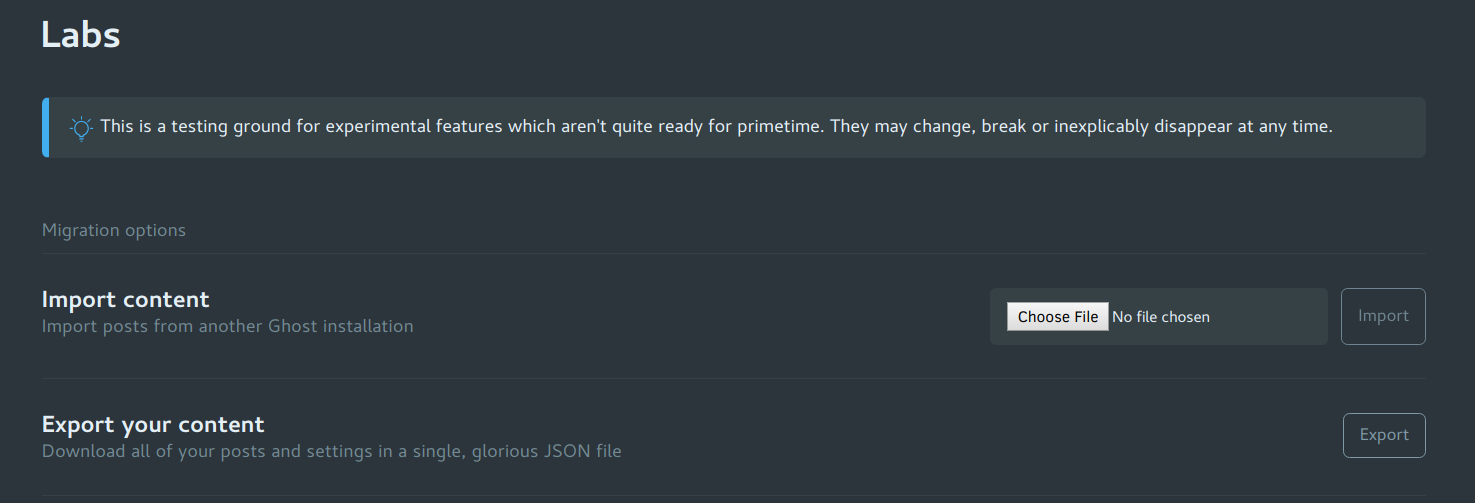
Then, modify your config.production.json to use a SQLite database.
As an example, here is mine:
{
  "url": "https://stanislas.blog/",
  "server": {
    "port": 2368,
    "host": "127.0.0.1"
  },
  "database": {
    "client": "sqlite3",
    "connection": {
      "filename": "/var/lib/ghost/content/data/ghost.db"
    }
  },
...
}
Make sure Ghost has the permissions to write there:
chown -R yourghostuser: /var/lib/ghost/Then restart the Ghost service. You should see the install screen, so follow it as if you were installing a new website.
Then, get back to your "Labs" tab and import your .xml export.
To clean things up, remove the default Ghost user and its posts and tags. You should also remove the Ghost user and database from MySQL, or even uninstall your MySQL server if you don't use it.
Now, we can see that our SQLite database is in our content/data folder:
root@lyra /d/ghost# du -hs content/data/ghost.db
584K	content/data/ghost.db
So here were are with our fresh and clean Ghost blog using an indeed lite SQLite database!
It's sad that Ghost doesn't allow use to use SQLite from the beginning. When ghost-cli didn't exist, it was the default, but now it's only in development mode.