Caching Ghost with Nginx

Caching Ghost with Nginx

Ever since I started this blog I have been using Nginx as a reverse proxy for Ghost.

Ghost is in a kind of weird place between real static and headless CMS like Hugo or Jekyll and fully-fledged CMS like WordPress. Ghost is a Node.js program based on Express that binds to a port and listen to HTTP requests, so it's not deployable like a static website with only static files.

However, the pages are actually static. In development mode, assets will be recompiled upon each request and views will be rerendered. In production mode however, views will be cached. Even with this internal cache, the node.js processes will still have to answer the queries, which doesn't scale well.

Since I was already using Nginx, setting up some proxy cache was really easy and had a huge impact on performance. Since most of my content does not change over time, caching really makes sense.

From my experience, pages cached by Nginx will have a TTFB down to twice as short, and most importantly they'll be able to sustain about 10 times more concurrent requests, at least on my setup, with much less CPU usage. This is useful for high traffic spikes like when I post a link to my blog on Mastodon and hundreds of instances try to fetch the pages in the span of a minute.

My setup has recently changed and I'm using Caddy as a single TLS-terminating reverse proxy, but Ghost still has its own Nginx in its LXC container, which only answers HTTP. The configuration is still easily adaptable.

Here is my configuration, with some comments:

proxy_cache_path /tmp/nginx_ghost levels=1:2 keys_zone=ghostcache:600m max_size=100m inactive=24h;

server {
    listen 80;
    listen [::]:80;
    server_name stanislas.blog www.stanislas.blog;

    if ($host = stanislas.blog) {
        return 301 https://stanislas.blog$request_uri;
    }

    access_log /var/log/nginx/ghost-access.log;
    error_log /var/log/nginx/ghost-error.log;

    location / {
        proxy_set_header Host $host;
        proxy_set_header X-Real-IP $remote_addr;
        proxy_set_header X-Forwarded-For $proxy_add_x_forwarded_for;
        proxy_set_header X-Forwarded-Proto https;
        proxy_pass http://127.0.0.1:2368;

        # Remove cookies which are useless for anonymous visitor and prevent caching
        proxy_ignore_headers Set-Cookie Cache-Control;
        proxy_hide_header Set-Cookie;
        # Add header for cache status (miss or hit)
        add_header X-Cache-Status $upstream_cache_status;

        proxy_cache ghostcache;
        # Default TTL: 1 day
        proxy_cache_valid 1d;
        # Cache 404 pages for 1h
        proxy_cache_valid 404 1h;
        # use conditional GET requests to refresh the content from origin servers
        proxy_cache_revalidate on;
        proxy_buffering on;
        # Allows starting a background subrequest to update an expired cache item,
        # while a stale cached response is returned to the client.
        proxy_cache_background_update on;
        # Bypass cache for errors
        proxy_cache_use_stale error timeout invalid_header updating http_500 http_502 http_503 http_504;
    }

    # No cache + keep cookies for admin and previews
    location ~ ^/(ghost/|p/)/ {
        proxy_set_header Host $host;
        proxy_set_header X-Real-IP $remote_addr;
        proxy_set_header X-Forwarded-For $proxy_add_x_forwarded_for;
        proxy_set_header X-Forwarded-Proto https;
        proxy_pass http://127.0.0.1:2368;
    }

    # Bypass ghost for static assets
    location ^~ /assets/ {
        root /srv/ghost/content/themes/casper-xyz;
    }

    # Bypass ghost for original images but not resized ones
    location ^~ /content/images/(!size) {
        root /srv/ghost;
    }
}

Overall, it's caching everything except admin and preview pages. Also, it bypasses Ghost for static assets (theme's CSS and JS, images) since it has access to the storage. Nginx is very good at serving static files, so it's better to have it handle them than Ghost, since they are not processed (except dynamically resized images).
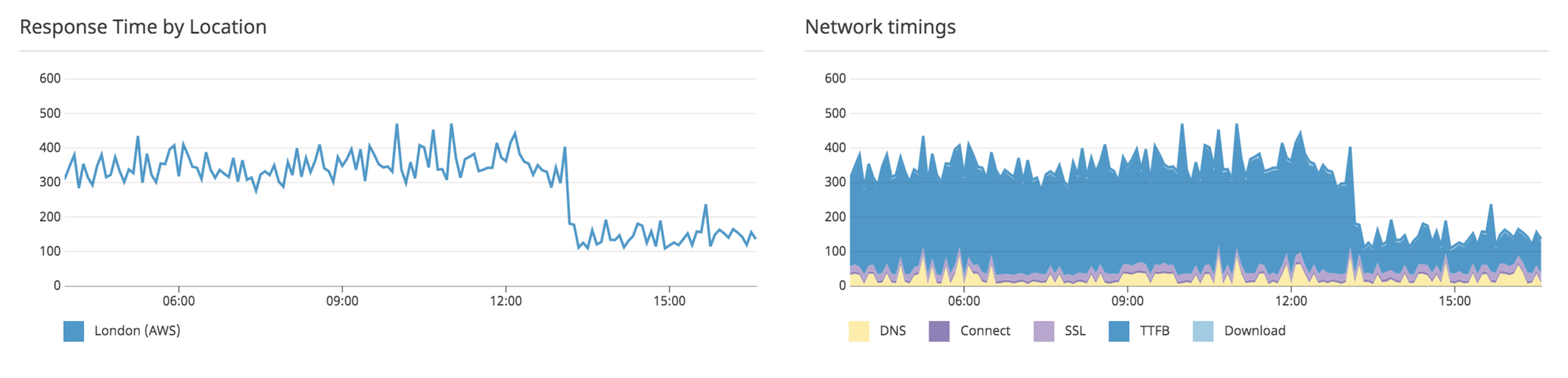
Ghost response times before and after setting up cache on Nginx
Stanislas
Author
Stanislas
I like building things with code and computers

Comments

15Atom feed
Markdown supported
  1. Ozx

    Hi Angristan, Thx for this post ! I 've a strange behavior (Front Nginx and/or HAproxy) when trying to log into ghost : "Unable to determine the authenticated user or integration. Check that cookies are being passed through if using session authentication."

    Is there a specific parameter to set for authentification ?

    1. StanislasAuthor

      In the default location we enable cache and remove cookies (which could cause this error). In the location ~ ^/(ghost/|p/)/, we don't remove cookies and since the path is /ghost/#/signin, it should work fine.

    2. Ozx

      Sorry I forgot to say that I'm using HAProxy as a single TLS-terminating reverse proxy and Ghost is running in a dedicated container with its own Nginx. It seems that I have a "cookie issue" between HAProxy & Nginx, I will see how to handle this.

  2. Thomas

    Hello, just a small comment about the following Nginx configuration : keys_zone=ghostcache:600m 600m is the amount of keys used by Nginx for storing cache. It's too much. 1m = One megabyte zone can store about 8 thousand keys.

  3. Anonymous

    I donʼt use Caddy, should I put the cache config still in the 80 block or in the 443? Thanks.

    1. Anonymous

      My theme does not show up when I change my Nginx config for caching. The blog is all white with the text only. Is it because I go with Docker ? I do not have a volume for the theme, I am OK with the default Casper as it is. Thanks!

    2. StanislasAuthor

      You probably have to remove that assets location block

  4. Anonymous

    It seems that "admin block" is not working anymore :-( "Unable to determine the authenticated user or integration. Check that cookies are being passed through if using session authentication."

    Do you face this too ?

  5. Jorge

    Hi angristan, I would be very interested in an article on how your configure your ghost installation with both nginx and caddy. So nginx listens to port 80 and caddy to port 443? I failed to understand how it works exactly :/ An article with config examples would be great! Thank you.

    1. StanislasAuthor

      Sorry, my Ghost and Nginx run in a container. But yeah otherwise Caddy would run on port 80 and 443 and Nginx on localhost:8080 or something like that.

  6. Immit

    Hi Stan,I was wondering which additional tricks do you use to cache your blog ? :-)

    1. StanislasAuthor

      Currently Varnish and Cloudflare, I'll write some posts about that!

  7. Othmane

    Hello everyone! Thanks very much for the configuration: node has much less work to do and it's extremely faster. Kudos to you, for sharing the setup.

    While trying the adapting the config

    I noticed an important problem I want to highlight.

    in this block:

        # No cache + keep cookies for admin and previews
        location ~ ^/(ghost/|p/)/ {
            proxy_set_header Host $host;
            proxy_set_header X-Real-IP $remote_addr;
            proxy_set_header X-Forwarded-For $proxy_add_x_forwarded_for;
            proxy_set_header X-Forwarded-Proto https;
            proxy_pass http://127.0.0.1:2368;
        }
    

    this row is causing an incorrect behaviour

    location ~ ^/(ghost/|p/)/ {

    the problem is that the trailing slash is present twice, once after 'ghost/', 'p/', and one more time at the end of the rule. This is causing the location rule to not be triggered when it's needed. Basically it's never triggered, since the URLs looks like example.com/ghost/ instead of example.com/ghost// <-- expected by the config.

    What happens is that everything is cached, also the previews and the ghost dashboard. You can try this, by accessing the /ghost page from a private tab. The frontend will load, any request will still trigger a 403, but the login form will not appear, instead the cached version will be server, if you access it first and triggered the cache generation.

    To fix this issue, correct the line I highlighted into:

    location ~ ^/(ghost/|p/) {

    One last note, if you have a newsletter, you should add also 'members/' to the exceptions.