Do not buy the LG 27UL850 monitor for its USB-C hub feature
Do not buy the LG 27UL850 monitor for its USB-C hub feature

I was looking for a 27" 4K UHD monitor and I realised it would be nice to get rid of most of my cables and get everything through USB-C, including charging. I have a Macbook Pro and I'm stuck with USB-C anyway, so I better only have one cable to plug.

There isn't actually that many monitors with a USB-C port, and those that have one are significantly higher priced. After reading and watching some reviews, it was clear to me that the monitor in that category was the LG 27UL850. Or the version that preceded it but that's nearly identical, the 27UK850. It's been described a the best USB-C monitor or the best monitor for Macbooks.

I bought this monitor for €550, so it's clearly a high-end monitor. I wasn't disappointed with the panel itself, which is incredibly sharp. The contrast is very good for an IPS panel, but it's still IPS.

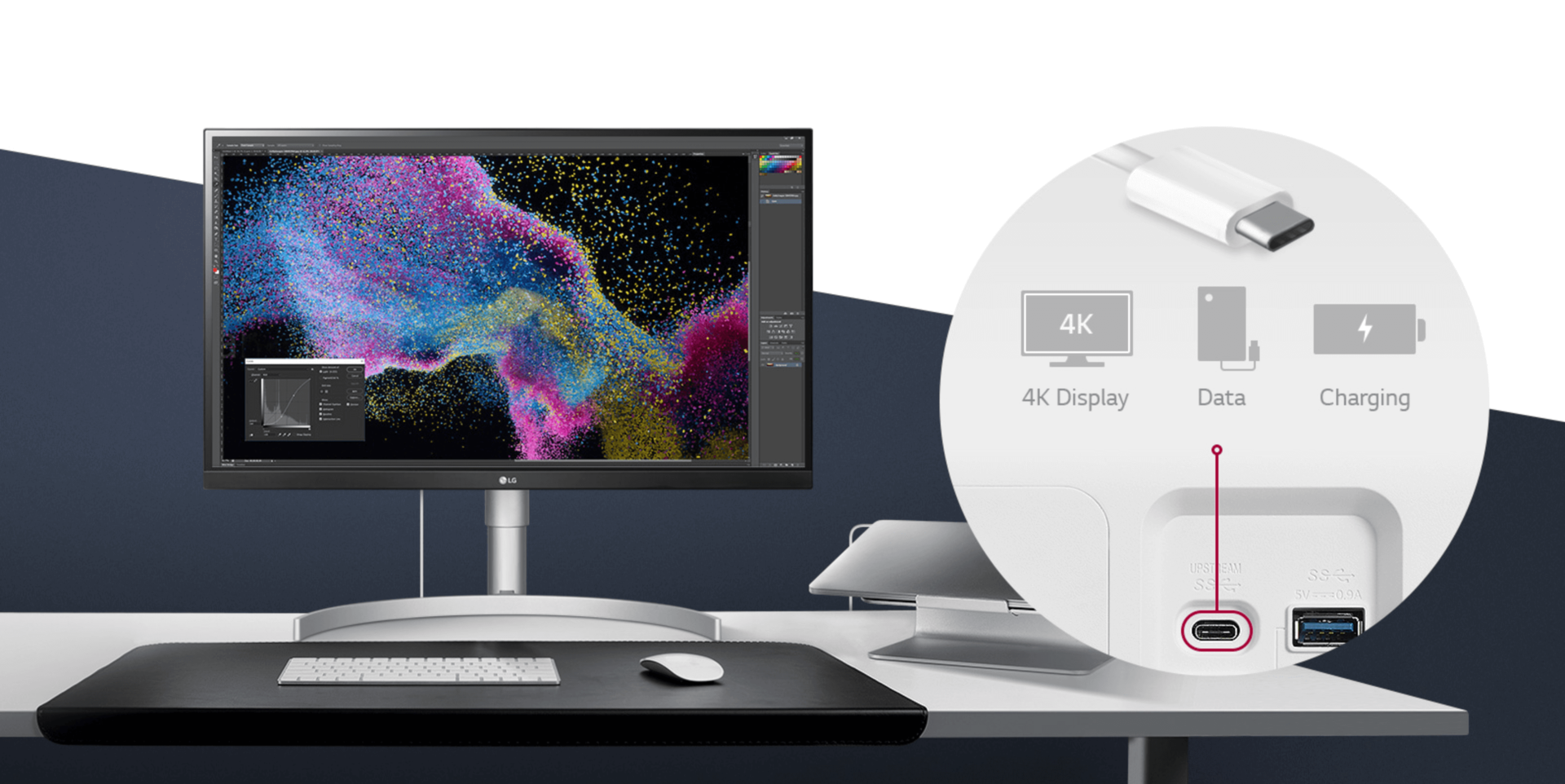
The USB-C feature worked as expected: plug the included USB-C/Thunderbolt 3 cable to the monitor and the Mac, and voilà, the display is powered through DisplayPort at 4K@60Hz, and the Macbook charges at up to 60W.

However, unless your setup is fully wireless, you might to plug some stuff in. I had a wireless keyboard and wireless mouse, but I had to plug my speakers to a USB DAC.

Indeed, I want sound, especially since my Macbook is resting closed on a stand now. I don't want to plug an extra cable to it, be it jack or USB, because it would kind of ruin the whole purpose of this setup. The speakers included with the monitor are terrible, as expected, but fortunately, there is an audio jack at the back of the monitor. While it works pretty well, there is a big issue: you can't control the volume from macOS, because it doesn't support the protocol that allows that. While there are some workarounds which I will go through in another post, it's not great and requires extra software running.

Since I have a USB DAC lying around I might as well use it to get a proper audio output. The monitor has two USB 3 ports at the back, perfect.

It works... Until the monitor goes to sleep.

After a few minutes my Mac turns off the display output, so any monitor goes to sleep at that point. The problem issue here is that once this LG 27UL850 monitor goes to sleep, it unplugs the USB hub. This is a major issue if you're using something like a drive connected to it.

In my case, I would not have minded that much since it's OK for my DAC to be unplugged. However, the real issue here is that the USB peripherals don't reconnect once you wake up the screen. The only fix that I found was turning off the display manually and turning it on again, or reconnect the Macbook.

It's a major deal breaker if you plan on using any kind of USB device.

I was wondering if I was the only one experiencing this and I wasn't:

I also found a thread on the LG forums.

I looked at all the possible settings on the monitor to see if there wasn't anything that could remotely trigger this.

After that, I contacted LG's support and they responded about a month later (I already had returned the monitor by then) telling me to disable the "deep sleep" option. This option turns off the monitor instead of going to sleep so that would have explained things. But it was off, since I already checked it. Thanks, LG.

Being stuck with two non-usable USB ports mean that I had to go through dirty workaround to get proper sound and that I had to plug stuff directly into my Macbook if I wanted to do anything.

This is not worth paying an extra 100 bucks on the USB-C feature, and seeing how I was struggling, even with a beautiful panel in front of me made me think: did I really spend that much on... this?


The LG 27UL850 might fit some use case where you rarely need any peripherals, like in an office, but for a home setup, I don't think it's worth spending money on.

Since I liked the panel, I decided to return it and go with a cheaper version. There are three versions in the 27UL/UK lineup, with the same panel :

  • The 850 (550€) with USB-C (DP + charging + 2x USB hub), 5W speakers, adjustable stand
  • The 650 (450€) without USB-C and speakers, but with the adjustable stand
  • The 600 (420€) without USB-C and speakers and with a non-adjustable stand.

The USB-C feature does not suit me, the speakers are worthless and I use a different VESA mount. Looks like I can get the same image quality without features I don't need for 130€ less!

The 27UL600 is still expensive but much more worth the money.

Side note: I had to get a replacement for my 600 because I had some weird issues where a big area of the panel would have some fine green sub-pixel lines... It was visible enough that I noticed before starting to check for defects like dead pixels. My new one is perfectly fine. with very minimal backlight bleed.

I have not given up on USC-C though, so I bought a USB-C dock with has a ton of ports while charging my Mac and powering the monitor through a single USB-C Thunderbolt 3 cable. The dock itself is not cheap and it ended up costing a bit more, but the experience is far, far better. I'll talk about this little marble of technology in another post.

Stanislas
Author
Stanislas
I like building things with code and computers

Comments

37Atom feed
Markdown supported
  1. Thomas

    Hey there,

    I have a quick question: You say

    and I use a different VESA mount

    What mount do you use? I am just curious as I am always on the hunt for a good setup ;-)

    Thx

  2. Sanxing

    Have the same issue, RIP, lol

  3. Buzut

    Setup similaire, j’ai un Phillips https://www.ldlc.com/fiche/PB00221297.html (j’ai pris 2 x 25 pouces plutôt qu’un 27). Les usb fonctionnent écran éteint, mais yes le fait de pas pouvoir gérer le son depuis le Mac alors que mes enceintes sont connectées en jack sur l’écran me rend dingue...

  4. eody

    Try to set "Automatic Standby" = Off. It worked for me.

    1. Mike

      This fixed the problem? Are you using a MAC? and not plugging the MAC in, just the monitor and connecting via USB-C?

    2. StanislasAuthor

      It didn't work for me. My mac will turn the display off after a while, which will put the display to sleep regardless.

  5. Same here...

    You are not the only one, similar problems here. Using LG with my MacBook, having just my mouse adaptor (still using old school radio based mouse - more reliable then BT).

    And ~ 1 in 3 wake ups of the display, USB hub is not responding, I have to remove and reconnect the USB-C to my MacBook.

    And couple of times a day my MacBook gives me warnings "device is consuming too much power, unplug" while nothing is connected to Macbook USB other the the mouse dongle through the LG's USB-C hub

  6. Mark D Godfrey

    Hi @stanislas - I just received the LG 27UK850 and Tried to connect via USB-C with the mfg USB-C cable. What I found is that the settings are very limited with USB-C connection and the Color was way off. (red looks like Neon Orange). I was forced to hook up using HDMI and found that the settings choices were much more vast and I was able to get the color similar to my Macbook Pro 16" Late 2019. So now I'm wondering why I should spend $200 more for USB-C and it doesn't even seem to work as expected. I got on a call with LG support and they were not helpful or knowledgeable. - What are your thoughts?

    1. StanislasAuthor

      I didn't have any issues with colors trough DisplayPort/USB-C! I use 2017 Macbook though.

    2. Matt

      Probably incredibly bad manners to reply to such an old thread, but something similar just happened to me with the LG 32UN880-B. I found in

      macOS -> System Settings -> Displays -> pick the monitor

      toggling the High Dynamic Range switch off gave me more realistic colours immediately and also many more options in the monitor's settings.

  7. Mike

    I'm also in the market for a 27" 4K monitor, and use a MacBook Pro. It would be nice to just plug in via the USB-C, and I'm using a 13", so it seems it would also power the MAC in most cases. I'm glad I came across this, before spending the extra money. Apple sells a version directly but it's 5K and 3x the cost ($1299). I also found another LG model (27UD88), that has USB-C, but I'm concerned that this has the same issue, and agree its probably not worth the extra if I need to have an extra plug anyway. Did you try this?... "Try to set "Automatic Standby" = Off. It worked for me"

    Thank you!

    1. StanislasAuthor

      It didn't work for me. Not sure if the other LG displays have the same issues. Maybe consider getting a dock instead of spending x3 for the display? It think it would result it a much more pleasant experience.

  8. James

    I have the 27UKL850 monitor here, and I can echo the exact same issues. I love the panel, and plugging in everything via USB is a great experience, but when the display sleeps, not only does it disconnect all peripherals, but it also stops charging the laptop. I've tried toggling the "Deep Sleep Mode" setting, to no avail; I'll try again now, but I'm glad at least that I'm not alone.

  9. Blazej

    Similar issue for me, I've "Deep Sleep mode" off, but anyway, when no signal detected from USB-C, it turns off USB hub, which is a bug, because in the manual it says - only when Deep sleep mode is on, the usb charging and hub function will not work.

  10. ntcm

    I’m also looking for 27” 4K display for my MBP15 and am really disappointed by all that “panel lottery” thing. I started with Dell which I considered solid and reliable. Tried P2127Q and it has usb-c feature done well. It has also 5W more output compared to LG. The problem though was with white/gray uniformity - you could clearly see one part of the screen had green and the other part had red/pink tint. It was driving me nuts... I compared it directly with S2721QS model - it was cheaper, had no usb hub at all (looked better IMO with white back though ;)). It had much better brightness (even though they’re the same in specs, only contrast is supposed to be higher in S model, 1300 vs 1000 in P) and I think picture was generally better. Unfortunately it also suffered uniformity issue, this time just green tint on bottom side of the screen. Also pretty annoying. I was about to try UL850, but after reading this article I’ll check UL650 (I also have TB3 dock, but I was hoping to get rid of it for even less mess with isb-c display...). Doh...

  11. Scott

    Hey Stan — I've been struggling with similar issues, but after installing Big Sur on my MBP, it seems like it might be fixed. Have you noticed the same?

    1. StanislasAuthor

      Interesting! I don't have that display anymore so I don't know. I'll try at work.

    2. Per

      I am really interested in if it works fine with Big Sur. If Yes, I will buy it to use with my macbook and also with windows computers from work.

    3. Scott

      So after testing this some more, I'm not actually sure it was Big Sur that made a difference. I also changed the port on my MacBook that I was plugging into. I've been told that some ports can be problematic, and even cable orientation sometimes. After swapping from left rear port, I've tested left front and right rear and so far the display is sleeping correctly when the MacBook does and the wireless charger I have plugged into the USB hub on the monitor is remaining connected. Fingers crossed this is now solved for me. Hope you have the same luck too.

    4. Ludo

      Hi Stan Which display do you finally use for your home setup? I’m really interested in same setup Thx

    5. Ludo

      Thx for your swift reply. Correct me if I’m wrong but it seems that the Ul600 do not have any usb-c . If so, how donyou plug your MB to your screen?

  12. Thorsten L

    Hello, under Windows there is the same probleme: The lockscreen is only shown for one minute, after that the output to the monitor is off and the other things at the monitor, like mouse or audio output are not working. But there is a solution, to change the lockscreen timeout in windows. It is not one klick, but at teh end it works, eg with 120 minutes timeout and the problem is no problem anymore.

    Here is the tip: https://www.windows-faq.de/2018/07/08/ausschalten-des-bildschirms-im-windows-10-sperrbildschirm-konfigurieren/ (only german, but with a translator no problem, I think)

    My 27UL850-w is arriving in two weeks.

    Best greets from Hamburg,

    Thorsten

    1. Philipp M

      Hey! I am considering buying the 27UL850 as well and to use it with a Dell XPS 25 7590. Did you have any issues with the monitor?

  13. vinit

    simple solution is to download the lg monitor software for Mac or windows and then it all connects properly and works as it should it also corrects the wake up closed lid problem

  14. Jonathanb

    Im late to this discussion, as of Q3 last year I've been running the 2 x 27UL850s for a MBP 2017 and now recently a MBP 2020. I use the monitors as a hub for a wireless mouse, ethernet wired connection (through a USB adapter), apple wireless keyboard (as in I connect up when needing a charge) and on occasions an external HDD. The mouse works fine to bring the monitors out of sleep but I can agree with the ext HDD being constantly disconnected. Anyway can see how it is a dealer breaker for some but for me a dual 27" 4K display on a vesa mount is amazing for productivity and ultimately for what I've used it for so far.

  15. Ken

    Turn off automatic standby and deep sleep mode - it won't disconnect then.

  16. Rico

    Hi, i am also looking for a one cable setup between a macbook pro 13" (2016 w/ touch bar) and a 4k monitor (+ usb devices through the usb hub). It would be great if informed folks and owners of this monitor (and the latest version 27un83a-W) could give us some feedback and an update on Stanilas related issues, that are:

    1. Unability to control volume from mac os? I found this really strange since the monitor has builtin speakers, so if you can't control audio jack volume, you can't either on builtin speakers...

    2. Usb devices disconnected after monitor getting back from sleep mode? This can be really annoying in many cases, like, (i guess...) if you're wireless mouse dongle is plugged into the monitor, how do you wake-up the monitor at all?

    Some comments suggest that with "Automatic Standby & deep sleep = Off" solves the issue, but others don't. Can an owner with the latest firmware (april 2020) give us an update on this issue?

    Also, i found an alternative monitor, the HP U28 4k but after reading the user manual, it warns user in a highlighted note that video stream from usb-c isn't detected automatically (ok via hdmi & DP), it needs to be set manually.... (strange...)

    1. Is this the same with the LG monitor? or when you plug the included usb-c cable, it detects automatically video input?

    Thanks Stanislas for you experience feedback on this monitor, and for any additional feedbacks ;-)

    1. Clay

      I have the Lg27UL850-W and a surface laptop 3 and it work flawlessly. The system can go to sleep over night and wakes immediately on mouse movement with all USB devices working.

  17. Geo B

    I have the same monitor (2 actually): 27UL850 and 27UK850, and neither monitor has this issue. The windows dont get moved back to my mac (2017 macbook pro 15"), and I can use the wired mouse/keyboard to wake the laptop.

  18. Jorn

    I have the LG 27UL850. It's a pretty screen. But sometimes the charge function of the USB-C is not working, after my macbook wakes up from sleep. Also the speakers really sucks haha.